Base Material Setup
| ▼ | Nanite | |
|---|---|---|
| Enable Tesselation | [x] |
| ▼ | Displacement | Value |
|---|---|---|
| Magnitude | 0.15 | |
| Center | 0.5 | |
| ▼ | Displacement Fade | Value |
| - | ---------- | ---------- |
| Start Fade Size (Pixels) | 8.0 | |
| End Fade Size (Pixels) | 3.0 |
| ▼ | Usage | |
|---|---|---|
| Used with Nanite | [x] |
Example Node Setup
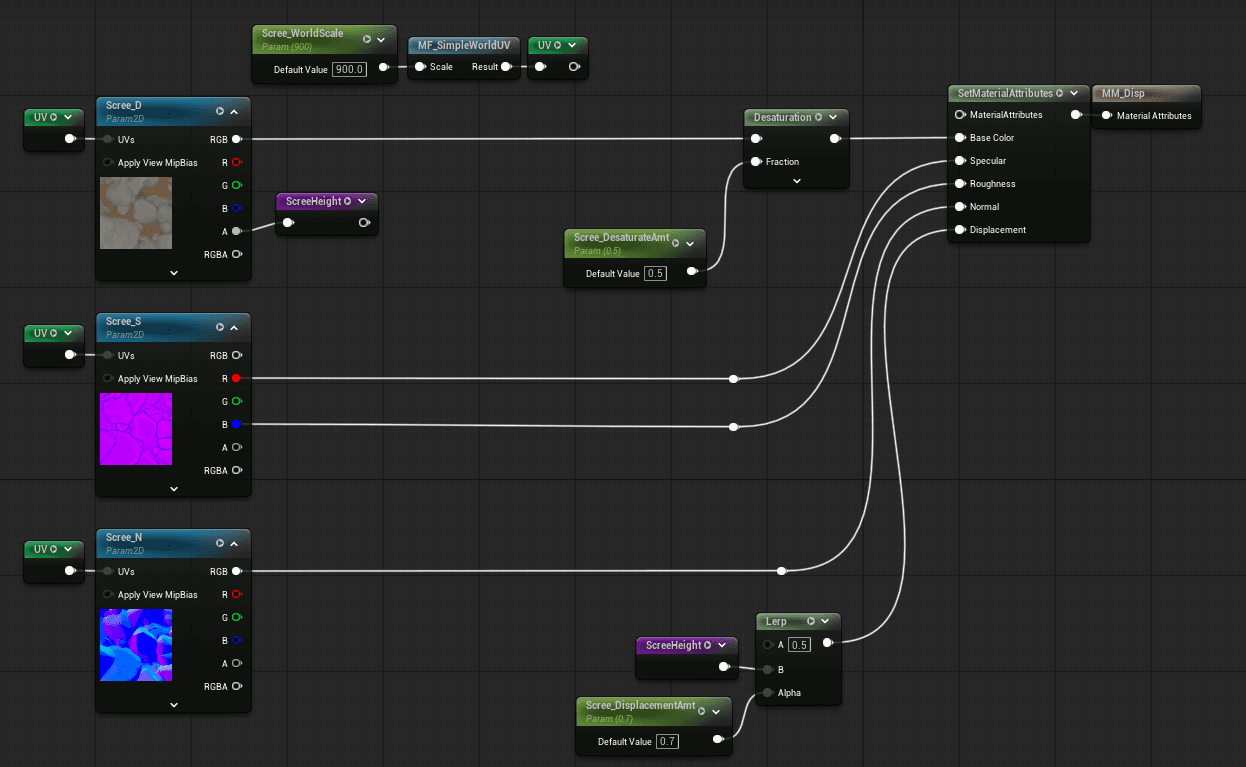
When working with Epic Games textures, the alpha channel of the albedo is utilized because it stores the baked height information needed for displacement.
Height Texture Lerp Explanation
-
In this material setup, the height texture is processed using a linear interpolation (lerp) with a factor of 0.5 between the texture value and a neutral midpoint. This effectively biases the height map toward the center value, reducing extreme displacement while preserving relative surface variation.
-
The alpha channel, modulated by scree_displacement_amount (set to 0.7), is used to control the influence of displacement across the surface. By scaling the alpha this way, we can:
-
Limit the maximum displacement to avoid unnatural surface protrusions
-
Blend areas of high and low displacement smoothly
-
Maintain fine detail without introducing harsh artifacts
-
Rationale: This combination ensures that the terrain deformation driven by the height map remains subtle and controllable, preventing overly sharp features while allowing enough variation for realistic scree/rock scatter. The lerp provides a baseline reference (0.5) to stabilize the displacement, while the alpha factor scales the contribution dynamically across the texture.
Enabling Landscape Displacement (Nanite)
To enable displacement on landscapes, select the master Landscape actor in the scene and enable Nanite in the Details panel.
After checking the option, save the project to apply the changes. Once Nanite is enabled, the landscape will support displacement-driven surface deformation as defined in the material setup.